As an Amazon Associate, Learn AI Tools earns from qualifying purchases. Prices and availability change on Amazon.
For creators seeking the best USB microphone for AI voice and podcasts, the Blue Yeti USB microphone remains a remarkably reliable solution for clear audio in AI voiceovers, podcasts, and virtual calls. Its multiple polar patterns adapt to various recording needs, from solo voice work for ElevenLabs to group discussions on Zoom. It connects directly via USB, offering simplicity and quality for creators needing a dedicated desk mic without complex setups. This mic still shows up in many creator kits for its versatility and ease of use, proving its enduring value in the rapidly evolving landscape of AI-powered content creation.
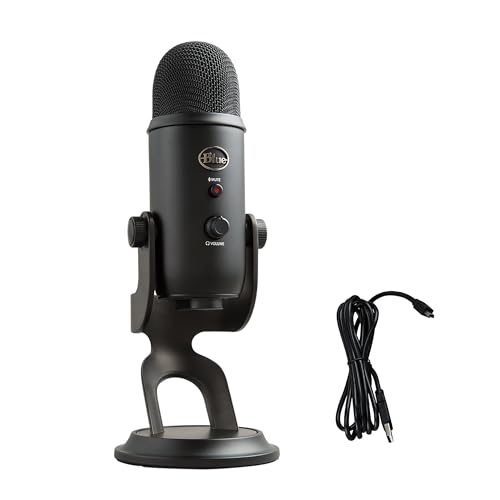
Why is the Blue Yeti still relevant for AI voice work in 2026?
- Its robust build and consistent audio quality have stood the test of time, providing a dependable foundation for any desk setup.
- The simplicity of USB connectivity appeals directly to creators focused on AI tools like ElevenLabs, who prioritize a straightforward setup over complex audio interfaces.
- Versatility with multiple polar patterns covers various recording scenarios efficiently, making it a Swiss Army knife for audio capture.
In an era where AI-driven voice synthesis and content generation are paramount, having a clean, high-fidelity audio input is critical. The Blue Yeti, manufactured by Logitech, continues to deliver on this front. Its enduring popularity, as evidenced by its continued presence in creator setups, stems from its ability to provide professional-grade audio without requiring a separate mixer or phantom power. This makes it an ideal companion for a desk equipped with a powerful PC for AI tasks, a high-resolution webcam for video calls, or a dedicated portable SSD for large project files.
What makes the Blue Yeti suitable for ElevenLabs-style voiceovers?
- The cardioid polar pattern effectively captures a single voice directly in front of the mic, minimizing room noise and focusing on your speech.
- Its clear frequency response ensures AI voice models receive high-fidelity input for optimal output, leading to more natural-sounding generated voices.
- Built-in gain control allows for easy adjustment to match your voice and recording environment, preventing clipping or overly quiet recordings that could degrade AI training data.
When working with advanced AI voice generation platforms like ElevenLabs, the quality of your source audio directly impacts the fidelity and naturalness of the output. The Blue Yeti excels here by providing a clean, articulate signal. According to the Logitech Blue Yeti USB Microphone Product Page, its condenser capsules are designed to capture detailed sound, which is crucial for AI models learning the nuances of human speech. For solo voiceovers, the cardioid setting ensures your voice is isolated, reducing background distractions that could confuse an AI model.
How does the Blue Yeti perform for podcasting and virtual calls?
- Omnidirectional mode is excellent for capturing multiple speakers around a desk during a podcast or group call, ensuring everyone is heard clearly.
- Bidirectional mode works well for two-person interviews facing each other across the mic, providing distinct audio channels for each speaker.
- The headphone jack enables real-time, zero-latency monitoring of your audio, crucial for live communication and ensuring your voice is coming through correctly.
Beyond AI voiceovers, the Blue Yeti is a staple for conversational audio. Whether you're hosting a podcast or participating in a critical Zoom meeting, its versatility shines. The ability to switch polar patterns on the fly makes it adaptable for various scenarios. Pairing it with quality noise cancelling headphones can further enhance your experience, allowing you to monitor your audio without external distractions. This ensures you sound professional, whether you're discussing complex AI algorithms or collaborating on a creative project.
Which polar patterns does the Blue Yeti offer and when to use them?
Understanding the Blue Yeti's polar patterns is key to maximizing its utility for your AI-focused audio tasks. Each pattern is designed for specific recording environments:
- Cardioid: Best for solo vocals, podcasts, voiceovers, and instruments, picking up sound primarily from the front. This is your go-to for ElevenLabs voice input or solo streaming.
- Omnidirectional: Ideal for conference calls or recording multiple people in a room, capturing sound from all directions. Perfect for group discussions or capturing ambient sound.
- Bidirectional: Perfect for two-person interviews or duets, picking up sound from the front and rear while rejecting sides. Position the mic between two speakers.
- Stereo: Captures a wide, realistic sound image, suitable for instruments or immersive soundscapes. While less common for direct AI voice input, it can be useful for capturing environmental audio for AI sound design projects.
What are the setup requirements for the Blue Yeti?
- Connects directly to your computer via an included USB cable, eliminating the need for complex audio interfaces.
- Compatible with Windows and macOS, typically plug-and-play without needing specific drivers, making it universally accessible.
- Requires a stable desk surface or a compatible boom arm for optimal placement, ensuring consistent audio capture.
One of the Blue Yeti's most appealing features is its straightforward setup. As highlighted in the Logitech Support: Blue Yeti Setup Guide, it's designed for immediate use. Simply plug it into a USB port, select it as your input device in your operating system's sound settings or your preferred AI application, and you're ready to record. This ease of use makes it a strong contender for any creator's desk, whether you're also managing a Stream Deck for quick commands or a drawing tablet for AI art generation.
Here's a quick comparison of the Blue Yeti to another popular USB microphone option:
| Feature | Blue Yeti USB Microphone | Rode NT-USB Mini (Alternative) |
|---|---|---|
| Connectivity | USB-A | USB-C |
| Polar Patterns | Cardioid, Omnidirectional, Bidirectional, Stereo | Cardioid |
| Direct Monitoring | Yes (Zero-latency headphone jack) | Yes (Zero-latency headphone jack) |
| Built-in Controls | Gain, Mute, Headphone Volume, Polar Pattern Selector | Headphone Volume |
| Mounting Options | Integrated desk stand, standard thread for boom arms | Integrated magnetic desk stand, standard thread for boom arms |
| Best For | Versatile recording (solo, group, interviews, music) | Solo vocals, streaming, podcasts (more compact) |
Maintaining your Blue Yeti for consistent audio quality.
To ensure your Blue Yeti continues to provide the high-quality audio essential for AI voice work and other creative endeavors, a few simple maintenance steps are recommended:
- Keep the microphone clean and free from dust, especially the grille, to prevent obstruction of the capsules.
- Store it in a dry, safe place to prevent damage to internal components from moisture or impacts.
- Ensure proper USB cable connection to avoid intermittent audio issues or dropped signals during critical recordings.
Regular maintenance will prolong the life of your microphone and ensure that the audio input for your AI projects remains pristine. A reliable USB-C charger for your other devices and a clean workspace can contribute to overall desk longevity.
Where can you purchase the Blue Yeti USB microphone?
- The Blue Yeti is widely available through major online retailers like Amazon.
- For current pricing and availability, check the live listing on Amazon.
- As an Amazon Associates participant, we may earn from qualifying purchases made through our links, including the one for the Blue Yeti USB Microphone - Blackout, which provides product features and general description.
The Blue Yeti USB microphone continues to be a top choice for creators seeking a dependable and versatile audio solution for their AI voiceovers, podcasts, and virtual communications. Its ease of use and multiple polar patterns make it a valuable asset for any desk setup. Consider how its features align with your specific AI workflow and content creation needs. Take the practical step this week of evaluating your current audio setup and determining if the Blue Yeti can elevate your sound quality for all your AI-powered projects.